|
Easy Connectivity
 Includes
Advanced Connectivity Tools for Connecting to Your Data!
Includes
Advanced Connectivity Tools for Connecting to Your Data!
Connectivity Tools
 ships
easier, faster, and with fewer errors using its advanced
connectivity tools. The External Link
“tool box” in CPS provides easy connectivity to your existing
data, whether you ship one package at a time or many
packages at once in a batch. CPS can automate the entire shipping
process and even has "hands-off", totally automatic shipping! ships
easier, faster, and with fewer errors using its advanced
connectivity tools. The External Link
“tool box” in CPS provides easy connectivity to your existing
data, whether you ship one package at a time or many
packages at once in a batch. CPS can automate the entire shipping
process and even has "hands-off", totally automatic shipping!
Whether accessing a company
database, an accounting program on a networked PC, or shopping
cart order files from an ecommerce system, CPS increases parcel
velocity through your business and lowers operating costs. CPS
connectivity tools combine with CPS features, such as
Default/Skip Schemes, to eliminate keystrokes when you ship.
CPS
pioneered a number of ways for shipping systems to use existing
data. Special data translation tools for ODBC compliant tables,
special features for SQL data, transparent data importing and even
a real “hands-off” processing mode. Every situation can be
different and CPS has the tools to help.
Special Note: CPS comes with very flexible, advanced tools to
connect to your data. We try our best to back up all of our
connectivity tools with easy-to-use interfaces and on-line help. Many
of our clients say linking to company data is easy with CPS, but others
need help due to special requirements. In this case we give you
choices. One solution is to use one of our
Ready-Made Solutions.
If you do not find a Ready-Made Solution that fits your needs and you
are unsure if your company has the needed technical resources, contact
one of
Harvey Software's
Business Partners.
Harvey Software Business Partners are experts in getting your data
connected to CPS. If you still do not find solutions,
email us
with your needs.
See How
Fast Parcel Processing Solves Your Shipping Problems...
 ODBC and External Link - Real
Time Connection to Your Data ODBC and External Link - Real
Time Connection to Your Data
ODBC (Open Data Base Connectivity)
in CPS is a smooth, reliable real-time link to your shipping
data. Just enter the order or consignee ID and CPS collects the
shipping data in "real time" from your in-house systems. After
the parcel is processed, CPS can also send the shipping
information back to your linked system. The external data can
be located on just about any type of system, from mainframes to
client server systems to stand-alone databases on your shipping
computer. All that is needed is a Level 2 compliant ODBC driver
and your system is ready for streamlined shipping! ODBC support
is included with every CPS package.
With ODBC and External Link you can:
 |
Collect data from a single table
|
|
|
Collect data from a second table
looked up from a link in the first table
|
|
|
Collect data to a SQL Stored
Procedure1 on your SQL Server
|
|
|
Translate data coming from and
going to your table
|
|
|
Write shipping data collected back
to your table
|
|
|
Update a record on write back to
your table
|
|
|
Write back changes to already
processed parcels
|
|
|
Write back deleted parcel
information
|
|
|
Auto-process separate first and
last name fields
|
|
|
Include time stamps with write back
data
|
|
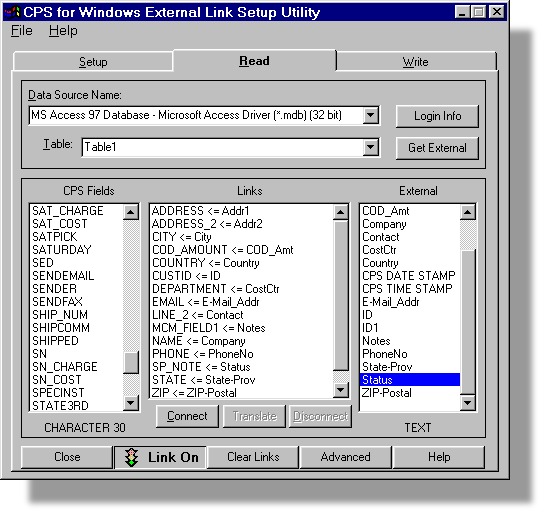
ODBC Setup is fast. You just choose
your data table and match your data fields to CPS through an
easy to use graphical interface. Once this is set up, it only
needs to be changed if your data table changes. Data entry for
your shipping department becomes a snap.
Click to Enlarge
Sample External Link Set up Screen
ODBC is one an excellent way to link
your in-house data to CPS. Using ODBC helps lower system
maintenance and upgrade costs as your other software systems
change over time.
To learn more about why you should consider
ODBC, read the article from DataDirect Technologies2 web
site entitled "PRODUCT
OVERVIEW - Why developers should use ODBC instead of native proprietary
database interfaces"
(PDF).
1 Stored procedures are small
stand-alone programs or routines written (usually) in SQL (Standard
Query Language) and stored in a database for easy retrieval by other
programs or procedures. A stored procedure contains a set of operations
or queries to execute on a database server. Stored procedures should
only be used if your database query is more complicated than a one or
two table look-up. The stored procedure does require programming and
maintenance on your part.
2 The article entitled "PRODUCT
OVERVIEW - Why developers should use ODBC instead of native proprietary
database interfaces" is a the property of DataDirect Technologies
(http://www.datadirect-technologies.com). © 2002 DataDirect
Technologies, Inc. All rights reserved. DataDirect Connect is a
registered trademark of DataDirect Technologies. Harvey Software is
using this article by permission. This article is provided for
information only. Harvey Software does not endorse the content or
accuracy of this article and/or claim that any of DataDirect
Technologies products will work with your data bases and/or CPS.
DataDirect Technologies offers a Wire Protocol ODBC driver for every
major database - Oracle, DB2, SQL Server, Sybase and Informix. (http://www.datadirect-technologies.com/products/odbc/odbcindex.asp)
The successful use of DataDirect Technologies products with CPS will be
your responsibility.

Background Importing/Exporting
- Add Packages as You Work
Background Importing and Exporting
moves data to and from an external data source automatically.
The shipping system operator just continues to process parcels.
Imported data is ready to be used immediately, and exporting is
so fast it is invisible to the shipping system operator.
Background Importing and Exporting is very versatile, extremely
stable, works in a multitude of environments and is easy to set
up. Background Importing and Exporting uses easy to work with
text files, and you can adjust CPS to use the data in your file.
|
|
No additional user steps needed to
import or export data
|
|
|
Keeps your shipping data in a
"holding" file until you are ready to use it
|
|
|
Included with every CPS package
|
|
The
Automator - Hands-Free Shipping
With the CPS Automator, shipping
becomes a hands-free operation. The Automator imports and
processes package data, prints shipping labels and
documentation, then exports data about the shipment - all
without any intervention. Shipping becomes a hands-off
process! This works especially well in areas where security or
user errors are of the utmost concern.
If you are interested in The Automator,
please contact one of our shipping software specialists. They will
be glad to give you the necessary requirements to make this method work
for you. This option is available in every CPS package.
|
|
Send data directly from your order
or other system to CPS
|
|
|
Handles International parcels and
commercial invoice items
|
|
|
Extremely fast package processing
|
|
|
Supports auto-processing of
separate first and last name fields
|
|
Batch Importing/Exporting - Add Packages by the File
If your shipping data is in a CPS
supported text file format, you can import this directly into
CPS. Batch Importing and Exporting is one of the oldest
methods
and is still a popular way to send data to CPS. You can adjust CPS
to use the data in your text data file.
Batch Importing is used to import the
following:
|
|
Daily Orders
|
|
|
CPS Customer Master File
Information
|
|
|
Commercial Invoice Product File
Information
|
|
|
Supports comma delimited (TXT, CSV) and fixed
field file formats along with XML, spreadsheet and other files
converted to CSV files
|
|
And for Yahoo! stores, eBay sellers and Amazon
merchants, batch importing is the perfect tool to easily ship
orders using the text order file each provides. Import the data
and you're ready to ship!
Include all the shipping information
(like the weight and method of shipping) in the data you import
into the CPS daily entry data base and CPS can automatically
process the data and print out all the required labels without
any extra steps in-between. Hundreds of thousands of parcels
are processed through CPS in just this fashion every day.
In addition, all the data stored in
CPS can be exported with pricing and shipping information just
as easily as it can be imported for processing. Batch Importing/Exporting is available in every CPS package.
Cut'N Ship® - Google
Checkout and Order Shipping

Cut'N Ship is one of the easiest ways to
link CPS to an order entry system. If you can highlight the address
text, copy it to the clipboard and paste it to Notepad, you can use
Cut'N Ship regardless of any non-shipping related data you collect. Cut'N
Ship adapts to varying address formats and works with multiple online
merchant account sources simultaneously.
Cut'N Ship comes already set up to process
Google Checkout™ Buy Now buttons and HTML API orders using the Google
Checkout merchant order information page. Cut'N Ship is a very powerful
tool and is included in all versions of CPS.
With just a few easy-to-follow steps, you
can automatically:
|
|
Extract "Ship To" information from
the online system |
|
|
Choose the best way to ship -
manually or automatically |
|
|
Clean up and correct address
information |
|
|
Add weight, extra services and
dimensions |
|
|
Print required labels and
documents |
|
|
Return tracking information to the
online system |
|
|
Stores shipping information for
future tracking and reference |
|
|
Use order numbers for reference
tracking |
|
|
Send shipment notifications |
|
Google Checkout™ is a trademark of Google. All
rights reserved. Use of the Google Checkout trademark does not mean or imply
there is a relationship or affiliation with, sponsorship, or endorsement by
Google of Harvey Software or its products. Harvey Software, Inc and Google are
separate companies. The use of Google's trademarks are for instructive purposes
only. Google Checkout helps you attract new customers, convert more sales and
lower transaction processing costs. Google Checkout™ is a checkout process that
you provide on your website to enable your customers to buy from you quickly and
securely, using a single username and password. And once they make a purchase,
you can use Checkout to charge their credit cards, process their orders, and
receive payment in your bank account.
Ready-Made
Solutions - Out-of-the-Box Solutions
(Prices and CPS Package Requirements
Vary)

To make life easier, many companies
find the power of CPS a great addition to their existing
products. Interfaces have been created with Harvey Software's
cooperation and partnership with other companies and these are
purchased directly from Harvey Software Business Partners.
Harvey Software Business Partners
are a group of software companies that install, set up and
support CPS interfaced to their business software and hardware
solutions. These companies supply all that is necessary to have
a seamless solution from consulting to the final solution.
Their scope is much larger than that of just the shipping
component as they often offer entire turnkey business solutions.
Due to the complexity of these
specialized applications, Harvey Software Business Partners
become the first line of support, and are then backed up by
Harvey Software's Technical Support staff whenever needed.
To learn more about Harvey Software Business
Partners click here.
Integrated Partners
– provide solutions for mail order, retail,
manufacturing, shopping cart, ecommerce system or other
applications using Harvey Software products for their shipping
solution. Integrated Partners are trained to resell and support
Harvey Software's supply chain tools.
|
|
Solutions Partners
- business consultants, systems integrators
and carrier service providers that provide enhanced services,
and can sell, install, support and train shippers in the use of
Harvey Software products. |
 CPS
Shipping Software Connects to Intuit QuickBooks CPS
Shipping Software Connects to Intuit QuickBooks

Do you use QuickBooks? Harvey
Software has several Business Partners that have links for CPS
shipping software to read from and write to Intuit’s QuickBooks
Accounting Software.
For more details on solutions for linking
to your Intuit's QuickBooks software?
Click here...

See How
Fast Parcel Processing Solves Your Shipping Problems...
|